A guide for Microsoft Partners to maximize recognition for their Azure services

Introduction
Microsoft boasts the largest partner ecosystem in the tech industry, with over 500,000 organizations worldwide helping Microsoft customers thrive. In such a competitive marketplace, partners need to harness every available tool to stand out and succeed.
Partner Admin Link (PAL) is one such tool that helps partners receive credit for their impact and achieve eligibility for incentives, credentials, and benefits. In this post, we will explore how PAL recognizes partners, how to establish a PAL relationship, tips for managing PAL, and the benefits of maximizing PAL tagging.
What is Partner Admin Link?
PAL is a feature in Microsoft Azure that lets partners associate identities (individual user accounts or shared services logins) in customer environments with their Partner ID, in turn recognizing them for managing Azure services on behalf of their customers. This helps partners who specialize in deployments and managed services receive credit for influencing the customer’s usage without necessarily being the same partner who bills them for their Azure subscription. This is also useful when customers contract multiple service providers to handle different Azure workloads; each partner gets recognized for the services over which they have an administrative influence.
Critically, PAL does not grant any additional permissions on top of what is granted to the identity; it simply ties the Entra ID account to the Partner ID for tracking purposes.
How Does PAL Benefit Microsoft Partners?
PAL is essential for partners aiming to maximize their recognition and rewards within the Microsoft ecosystem. Some of the key benefits include:
-
Boost Partner Credentials: 68% of customers searching for software solutions prefer Microsoft Partners with certified credentials. Badges like Solution Partner Designations, Specializations, and Certified Software Designations are critical to helping partners stand out and meet these requirements. However, earning these badges requires varying levels of proven Azure usage, either 1st-party (spent by the partner) or 3rd-party (influenced by the partner). By maximizing PAL linkage in managed projects, partners can accelerate their eligibility to earn these important badges.
-
Incentive Eligibility: Another benefit of becoming a credentialed partner is access to commercial incentives, like the Azure Accelerate program. This enables partners to receive additional funding directly from Microsoft for delivering proofs of value and production rollouts with customers. By having good PAL practices, you can maximize your recognition and incentive eligibility.
-
Business Insights: The Insights page in Microsoft Partner Center provides detailed analytics and reporting on Partner-influenced Azure usage, and can reveal valuable insights on workloads around which new services can be offered.

How to Establish a PAL Relationship
Setting up a PAL relationship is a straightforward process, and can be done interactively via Azure Portal, or automated via Powershell or az cli. We will list the interactive steps below:
-
Log in to the customer’s Azure environment with your user account. This can be a vendor email address, service account, or your usual work email that’s been invited to the customer’s tenant via Microsoft Entra B2B.
-
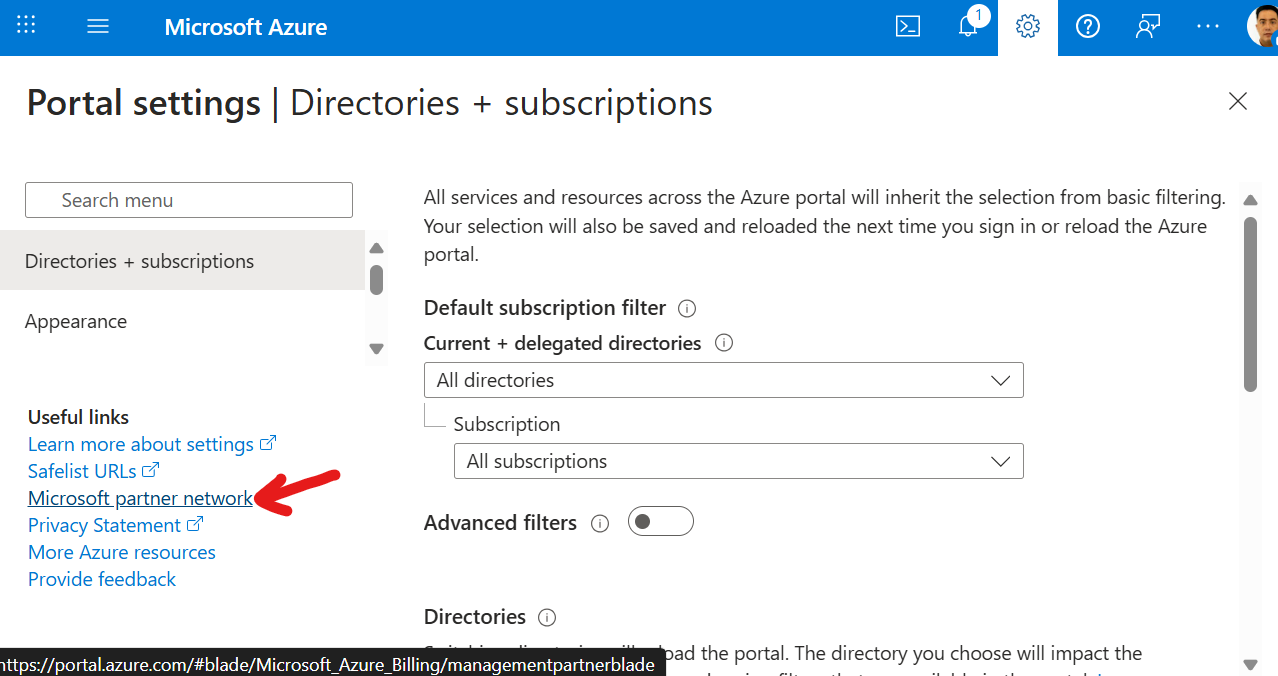
Navigate to the “Link to a partner ID page” or click on the Settings icon at the top right, followed by the Microsoft Partner Network at the bottom left.
-
Enter the partner organization’s Partner ID.
-
Save the configuration. The account has now been associated to your partner organization, and any Azure resources that the account has appropriate access to will start being credited towards your influenced Azure usage.
PAL Best Practices
- Choose PAL Projects Wisely: While it seems like a no-brainer to PAL every project you deliver, you should opt to link projects with long-term management and predictable growth. Some Azure credentials, like Solutions Partner Designation, require a history of year-on-year growth, and a one-month project with high usage can impact your ability to sustain this growth in the future.
- Assign Appropriate Permissions: PAL requires administrative rights to take effect, meaning roles with Owner or Contributor level access will receive credit. Reader roles will NOT receive credit.
- Principle of Least Privilege: While administrative rights are required, avoid granting excessive rights. If your role in the customer’s environment is managing certain Virtual Machines, then the
Virtual Machine Contributorrole, granted at the appropriate Resource Groups in scope, should be assigned. As customers audit their cloud security posture and identify appropriate scopes for employees and vendors, PAL credits should follow accordingly. - Apply PAL to all eligible accounts: If your customer has granted multiple vendor emails to you for your services, you can PAL all of them to maximize credit for services in scope. If you use a shared mailbox to log in and provide support, then PAL need only be done once.
- Transparency with Customers: PAL does not introduce security risks outside of permissions explicitly granted to eligible accounts. That said, it is still a good practice to explain the purpose and benefits of PAL to customers, and document their approval for compliance.
- Monitor and Review: Regularly review linked accounts and permissions to ensure ongoing security and correct attribution.
- Remove PAL When Needed: If a partner’s relationship with a customer ends, promptly remove the PAL linkage to avoid misattribution. Similar to the first point, having limited control over growth can lead to challenges with credential renewals.
Conclusion
Partner Admin Link is one of many useful tools that helps Microsoft partners receive recognition, incentives, and build their competitive edge in a busy marketplace. By setting up PAL correctly and following best practices, partners can ensure accurate attribution, maintain security, and foster trust with customers.
For more information, refer to the official Microsoft documentation and stay engaged with the Partner Center for updates.
Thanks for reading, and Happy Building!