What’s changing in Azure Key Vault API version 2026-02-01, why it’s changing, and how to prepare.
Introduction
Azure Key Vault’s new API version (2026-02-01) introduces a potentially breaking change for Key Vault users, establishing Azure Role-Based Access Control (RBAC) as the default access control model over the current access policies.
Existing Key Vault customers have one year (until February 27, 2027) to migrate to Azure Key Vault API version 2026-02-01, when all older API versions will be permanently retired, introducing errors in REST API Calls or Infra-as-Code templates.
While one year from now still feels like a ways away, this change brings an opportunity to review security standards and consider if Azure RBAC security is right for you. Also, I’ve seen some IT departments implement changes; it can’t hurt to start today ;).
This blog summarizes what exactly is changing, why it’s being done, and how you can prepare for 2026-02-01.
What’s changing
The Azure Key Vault REST API is used whenever a Key Vault is created or modified. When you write a Bicep/Terraform template, use the az cli, or even click through the Azure Portal, this API provisions and manages your Key Vaults.
The new API version 2026-02-01, rolling out this February, changes the default Key Vault creation process:
| Change | Current Behavior | New Behavior (2026-02-01 onwards) |
|---|---|---|
| REST Property | Access policies (enableRbacAuthorization = false) |
Azure RBAC (enableRbacAuthorization = true) |
| Permission Scope | Vault-specific permissions | Standardized Azure roles |
| Access Management | Independent per vault | Centralized through Microsoft Entra |
When this new version is released, customers using the Azure Key Vault REST API have until February 27, 2027 to:
- Migrate your deployment scripts (Bicep/Terraform templates, az cli scripts, etc.) to use REST API version 2026-02-01 or later
- Decide if you want to stick with access policies or migrate to Azure RBAC
Important: Cloud Shell users will automatically start using API version 2026-02-01 upon release, requiring immediate preparation. If you create a new Key Vault, be prepared that Azure RBAC will be the default setting!
Why the change?
Azure RBAC becoming the default access control model further unifies modern IAM across the Azure platform.
While access policies have been capable in assigning resource access to Keys, Secrets, and Certificates, they are native and exclusive to Key Vault, and can create challenges in enterprise environments scaling to dozens or hundreds of Key Vault resources.
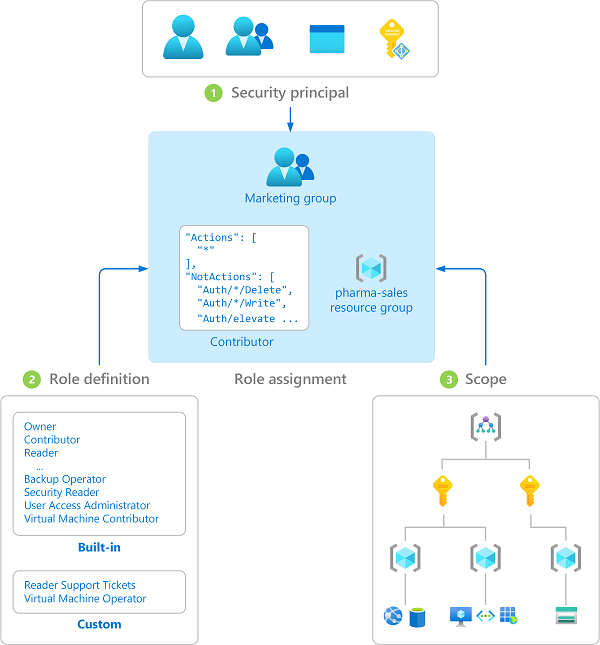
By applying the IAM concepts users are already familiar with in other Azure services (security principal, role definition, scope, and role assignment) to Key Vault, administrators can standardize how they manage and audit access to their most protected resources.
Step-by-Step Migration Guide
Step 1: Assess Your Current Environment
Identify which access control model your existing Key Vaults use.
Check a Single Vault
# Azure CLI
az keyvault show --name <KeyVaultName> --resource-group <ResourceGroupName>
Look for the enableRbacAuthorization property:
true= Already using Azure RBAC (minimal action needed)falseornull= Using access policies (migration recommended)
Check All Vaults in a Resource Group
# List all vaults with RBAC status
# 'enableRbacAuthorization' is renamed to 'rbacEnabled' for brevity
az keyvault list --resource-group <ResourceGroupName> \
  --query "[].{name:name, rbacEnabled:properties.enableRbacAuthorization}" \
  --output json
Check All Vaults in Your Subscription
# Subscription-wide assessment
# 'enableRbacAuthorization' is renamed to 'rbacEnabled' for brevity
az keyvault list \
  --query "[].{name:name, rbacEnabled:properties.enableRbacAuthorization}" \
  --output json

Note: Some guides will output the query to a table instead of json, but I observed that if
enableRbacAuthorizationis null, it will not appear in the table.
Step 2: Choose Your Migration Path
Based on your assessment, select the appropriate path:
Path A: Vaults Already Using RBAC ✅
If your vaults show enableRbacAuthorization: true:
- Update all templates and scripts to use API version 2026-02-01 or later
- Test thoroughly in non-production environments
- No access control changes needed
Template Update Example:
{
  "type": "Microsoft.KeyVault/vaults",
  "apiVersion": "2026-02-01",
  "name": "[parameters('keyVaultName')]",
  "properties": {
    "enableRbacAuthorization": true
    // ... other properties
  }
}
Path B: Migrate to RBAC (Recommended) 🔄
If your vaults show enableRbacAuthorization: false:
This is the recommended approach for enhanced security and centralized management.
Migration Steps:
- Plan RBAC role assignments before migration
- Enable RBAC on existing vaults
- Update all infrastructure templates
- Test access patterns thoroughly
Enable RBAC on Existing Vault:
# Enable RBAC on existing vault
az keyvault update --name <KeyVaultName> \
  --resource-group <ResourceGroupName> \
  --enable-rbac-authorization true
Required Permissions:
You’ll need the Microsoft.Authorization/roleAssignments/write permission (included in Owner and User Access Administrator roles).
Common RBAC Roles for Key Vault:
Key Vault Administrator: Full access to vault and all objectsKey Vault Secrets Officer: Manage secrets but not the vault itselfKey Vault Secrets User: Read secrets onlyKey Vault Crypto Officer: Manage keys and perform cryptographic operationsKey Vault Reader: Read vault metadata and certificates/keys/secrets properties
Path C: Continue with Access Policies (Legacy) ⚠️
If you must continue using access policies:
- Update templates to API version 2026-02-01
- Explicitly configure/declare the property
enableRbacAuthorization: falsein templates and CLI commands - Consider future migration to RBAC
az cli:
# Create new vault with access policies
az keyvault create --name "myNewVault" \
  --resource-group "myResourceGroup" \
  --enable-rbac-authorization false
ARM Template:
In ARM templates using API version 2026-02-01, explicitly set enableRbacAuthorization to false to keep using access policies.
{
  "type": "Microsoft.KeyVault/vaults",
  "apiVersion": "2026-02-01",
  "name": "[parameters('keyVaultName')]",
  "properties": {
    "enableRbacAuthorization": false,
    "accessPolicies": []
  }
}
Terraform
resource "azurerm_key_vault" "main" {
  name                = var.key_vault_name
  location            = var.location
  resource_group_name = var.resource_group_name
  tenant_id           = data.azurerm_client_config.current.tenant_id
  sku_name           = "standard"

  # Explicit setting required for API 2026-02-01+
  enable_rbac_authorization = false # or true for RBAC
}
Action Checklist
Use this checklist to ensure you’re prepared for the breaking changes:
Before February 27, 2026
- Inventory all Key Vaults and their current access control models
- Choose your standard access method moving forward (RBAC vs. access policies)
- Update development/test environments
- Test application access patterns
Before February 27, 2027 (Critical Deadline)
- Update all ARM/Bicep/Terraform templates to API version 2026-02-01+
- Migrate production Key Vaults to chosen access control model
- Update CI/CD pipelines and deployment scripts
- Train operations teams on new access control model
- Update documentation and runbooks
Ongoing
- Monitor for access issues after migration
- Review RBAC role assignments regularly
- Plan future Key Vault deployments with RBAC by default
Conclusion
Don’t wait until the deadline. While this change may not immediately impact your existing Key Vaults, the need to upgrade to 2026-02-01 introduces an opportunity to revisit and standardize your approach to credential security. Take advantage of the chance to consider a standardized access model, and review your deployment resources to explicitly state the direction your organization will take moving forward.
Additional Resources
- Prepare for Key Vault API version 2026-02-01: Azure RBAC as default access control
- Azure RBAC vs. Access Policies Comparison
- Complete RBAC Migration Guide
- Key Vault RBAC Implementation Guide
- Azure Key Vault Best Practices
Thanks for reading, and Happy Building!